Free
€0
The last 100 things you copied, plus everything you pinned.
Clipboard history
Press ⌘⇧C, type a few letters, press Return, and it’s back on your clipboard. Text, links, images and files, kept on your Mac. Nothing from a password manager is ever kept.
Airlock is a Mac app for MacBooks with a notch. On your phone? Send yourself the link and open it on your Mac.
Free plan, no card needed · macOS 26 or later · Apple silicon
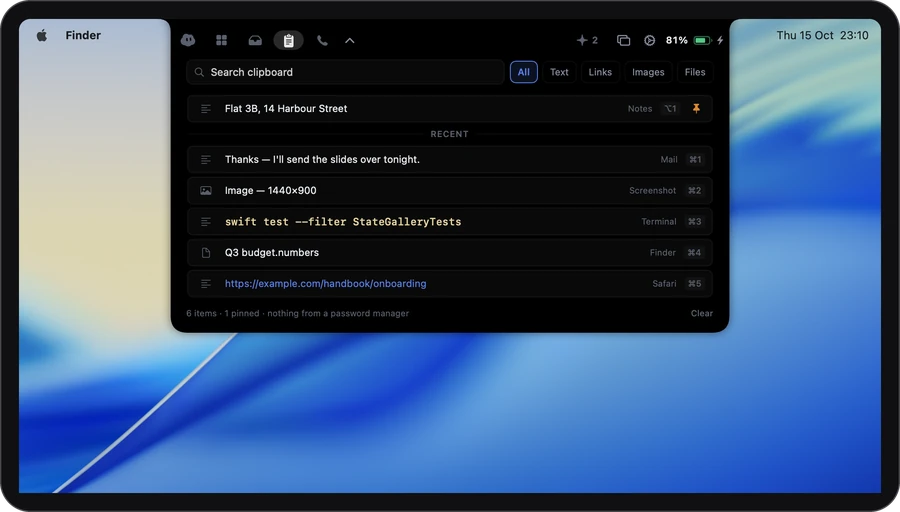
Text, links, images and files are kept newest first, with the app they came from.
The Clipboard tab opens in the notch. Type to search: capitals and accents don’t matter.
Click it or press Return, and it’s on your clipboard, ready to paste. ⌘1 to ⌘9 pick the latest nine.
Type a few letters. It’s back.
Nothing matches.
Nothing from a password manager is kept
Try it: type “cafe”, “brew” or “finder”.
Privacy
Your clipboard is kept in a file on this Mac that only your account can read. The privacy page lists every request Airlock makes.
It starts out like this. Everything is in Settings › Clipboard.
You can change ⌘⇧C in Settings.
€0
The last 100 things you copied, plus everything you pinned.
€3.99 a month
Up to 1,000 things you copied, plus your pins. Moving from Plus to Free hides older copies for 30 days. Nothing is deleted.
€7.99 a month
The same as Plus.
It asks for: Nothing. Accessibility only if you turn on auto-paste.
Compare the plans →No. Anything an app marks as private is skipped, and so is everything copied from Keychain Access and the common password managers. You can add any app to that list in Settings.
No. It’s stored on your Mac, readable only by your account, and never synced or uploaded.
Yes. Delete one item with ⌥⌫, or clear everything that isn’t pinned.
Text is kept as plain text, so it pastes cleanly anywhere. Images are kept as images, and files as links to where they are.
Yes. Text, images and links to files are all still there after you restart your Mac.
Notarized by Apple · macOS 26 or later · Apple silicon
or brew install --cask gdelolmo7/tap/airlock