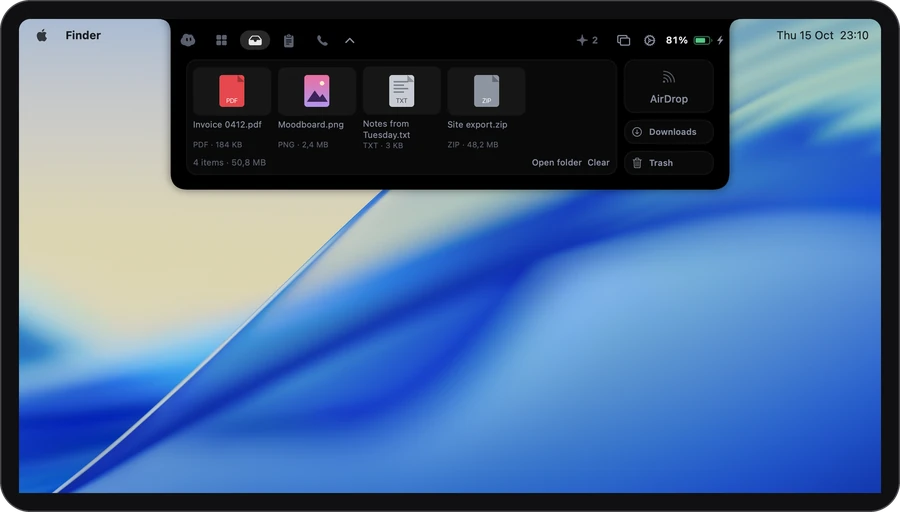
How it works
-
1
Drag to the notch
Drag a file or folder up and let go. Pictures from web pages are saved as files too.
-
2
Carry on
It waits on the Shelf tab with its name, kind and size. Add more as you go.
-
3
Drag it out
Into a folder, an email or a chat. It leaves the shelf only once the other app has taken it. Or drop it on AirDrop, Downloads or the Trash.
The shelf
A place to put things down for a minute.
- Drag it out where you need it
- Drop on AirDrop to send
- Hold ⌥ as you drop to copy
- Remove sends it to the Trash
Shelf files live in a plain folder: tray, inside the Airlock folder in your home folder. Put a file there and it shows on the shelf.
The details
- Move or copy
- Dropping on the notch moves the file; hold ⌥ to copy it instead. Dropping on the open panel makes a copy.
- Add selection
- Brings what’s selected in Finder onto the shelf, as a copy.
- Nothing deleted for good
- Remove and Clear move files to the Trash.
- Never overwrites
- Moving a file to Downloads gives it a new name if one with the same name is already there.
- Files only
- Text and links are turned away with a short note. That’s what the clipboard is for.
- Right-click for more
- Open a file, show it in Finder, AirDrop it or remove it.
- Quiet reminder
- While the closed notch is showing something else, a small tray and a count say files are waiting. Files alone never bring it out.
Privacy
What stays on your Mac
The shelf is just a folder on your Mac. Airlock doesn’t upload, sync or look inside your files. The privacy page lists every request Airlock makes.
Stays on your Mac
- Every file on the shelf, in the Airlock folder in your home folder
- Pictures you dragged from web pages, saved as files
Leaves your Mac
- Nothing by itself. A file leaves only when you AirDrop it or drop it into an app that sends it.
Which plan
In every plan, Free included. All of Drop shelf is in Free, with no card and no account. Plus and Pro are for longer calls, better notes and more agents.
It asks for: Nothing to drop files. Add selection asks to control Finder, and moving to Downloads asks for that folder.
Compare the plans →Questions
Are my files uploaded anywhere?
No. They stay in a folder on your Mac.
Does the shelf empty itself?
No. Files stay until you remove them or clear the shelf, and both send them to the Trash.
What happens when I drag a file out?
If the other app takes it, it leaves the shelf. If the app only makes a copy or reads where the file is, it stays on the shelf too.
Is there a limit to how much it holds?
No set limit. Shelf files take up space on your Mac like any other files.
Can I drop text or a link?
No, the shelf is for files. Text and links are what the clipboard history is for.
More in the notch
- Call notesOne tap as a call starts. The notes are ready when it ends.
- Clipboard historyEverything you copied, searchable.
- Media & soundNow playing, and a level per app if you turn it on.
- DictationHold ⌃, talk, let go. It types.
- TodayYour next meetings, one click to join.
- This MacHow hard it’s working, and who’s to blame.
- Keep awakeNo sleep while you need it.
- Coding agentsClaude Code’s questions, answered from the notch.