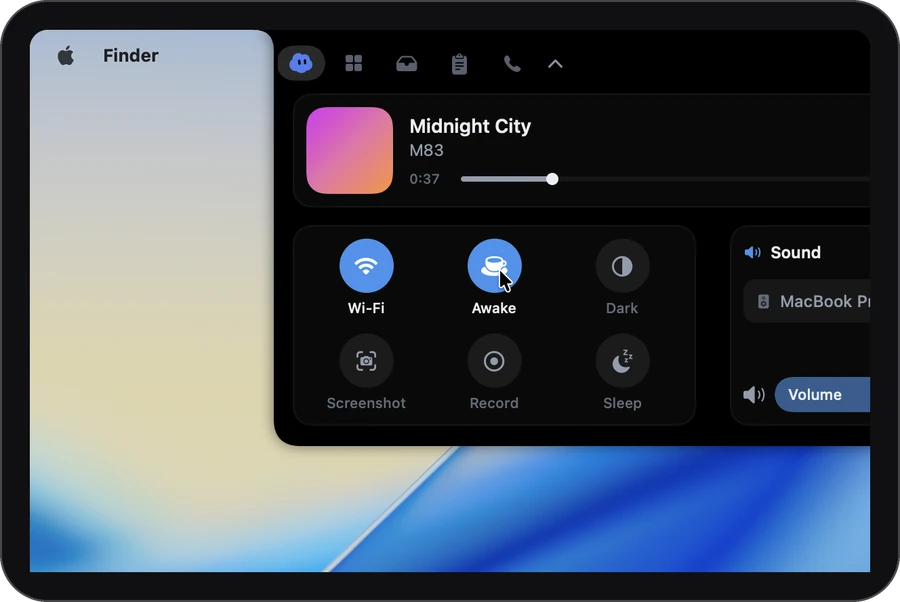
How it works
-
1
Click the cup
It sits with the system controls on the Home tab. One click keeps your Mac awake until you click it again.
-
2
Or pick a time
Its menu offers 30 minutes, 1, 2 or 4 hours, until a time you choose, or until you turn it off.
-
3
Let it end
When the time is up, your Mac can sleep again and the panel says so. Until then, a small cup in the closed notch means it’s on.
How long
Pick how long. It ends by itself.
Awake 1 h left1 hour left
Pick how long to see the time left
On by default: it also stays awake while Claude Code or Codex is working, and for two minutes after.
The details
- Screen on, or not
- The display stays on too, unless you choose “Let the screen turn off” to keep only the Mac working.
- Kind to your battery
- It can turn itself off when the battery drops below a level you choose, and the closed notch shows the cup with “off” for a moment. For agents, it stays awake only while plugged in, unless you turn on “Also on battery”.
- Closing the lid still sleeps
- Keep awake doesn’t fight the lid.
- A shortcut, if you want one
- Switch on ⌃⌥⌘W in Settings to turn it on and off from any app.
Settings
It starts out like this. Everything is in Settings › Notch.
- Turn it on and off from any app
- ⌃⌥⌘W
The shortcut is off until you switch it on.
- Stop on batteryNeverOr turn off below a battery level you choose
- While an agent is workingClaude Code or Codex, and two minutes after
- Also on batteryOff: agents keep it awake only while plugged in
- Let the screen turn offKeep the Mac working with the screen dark
- Keyboard shortcut⌃⌥⌘W turns it on and off from any app
Which plan
In every plan, Free included. All of Keep awake is in Free, with no card and no account. Plus and Pro are for longer calls, better notes and more agents.
It asks for: Nothing.
Compare the plans →Questions
Will it drain my battery?
Only if you let it. Choose a battery level at which it turns itself off, and agent work keeps the Mac awake only while it’s plugged in unless you say otherwise.
Does closing the lid still put my Mac to sleep?
Yes. Keep awake doesn’t fight the lid.
Do I have to remember to turn it off?
No. Pick a time and it ends by itself.
Does it keep my Mac awake for every agent?
For Claude Code and Codex while they’re working, and for two minutes after. Not while one is waiting for your answer, and only while plugged in unless you turn on “Also on battery”.
More in the notch
- Call notesOne tap as a call starts. The notes are ready when it ends.
- Clipboard historyEverything you copied, searchable.
- Media & soundNow playing, and a level per app if you turn it on.
- DictationHold ⌃, talk, let go. It types.
- TodayYour next meetings, one click to join.
- This MacHow hard it’s working, and who’s to blame.
- Drop shelfPark a file mid-drag. Drag it back out.
- Coding agentsClaude Code’s questions, answered from the notch.