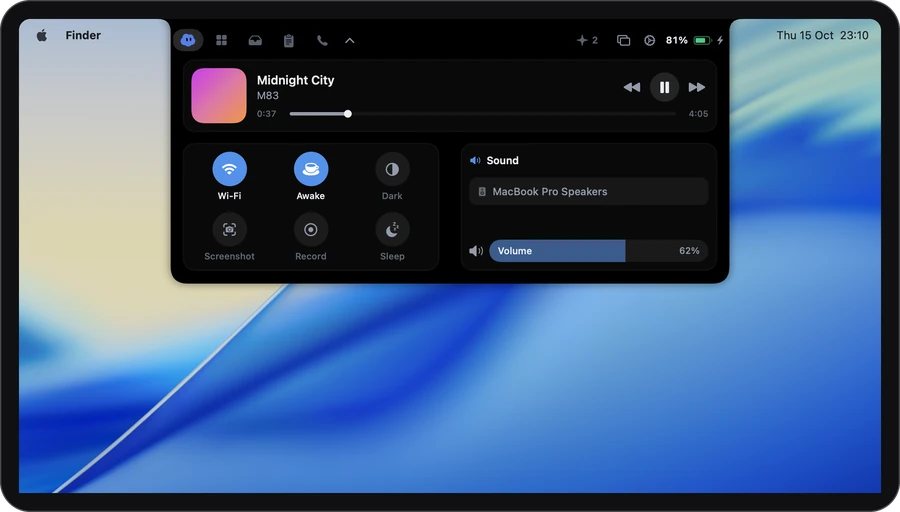
How it works
-
1
Play something
Start a song in Spotify or Apple Music. The closed notch shows small moving bars while it plays.
-
2
Open the notch
Artwork, title and artist, with previous, play or pause, next and a timeline to drag.
-
3
Set the sound
Move the volume, mute, or pick where sound plays: headphones or speakers.
Now playing
What’s playing, one glance up.

Closed · while it plays
Slow TidePaper Harbour
1:243:52
Open · point at the notch
Spotify and Apple Music. Click the artwork to open the player.
Per-app volume
A loud tab, a quiet call.
Turn on per-app volume in Settings and every app playing gets its own level and mute. Turn a browser tab down without touching the music or the call.
Off to start with. The top of each slider is the app’s normal volume, so nothing goes louder than it already could.
Spotify72%
Zoom90%
Safari24%
SlackMuted
+1 more app playing
The details
- Players
- Spotify and Apple Music. Sound from browsers and other apps shows up in per-app volume instead.
- Album art
- From Spotify’s own servers. With Apple Music, the card shows the Music app’s icon.
- Never starts a player
- If Spotify or Music isn’t open, Airlock leaves it closed.
- Paused music waits
- After you pause, the closed notch keeps the artwork for 15 minutes, and the card remembers what you last played for about a day.
- A level for each app
- Up to four apps show at a time, with a count for the rest.
- Not yet
- Per-app volume doesn’t work with a Multi-Output Device.
Privacy
What stays on your Mac
Airlock asks Spotify and Music what’s playing, right on your Mac. The privacy page lists every request Airlock makes.
Stays on your Mac
- What you’re listening to
- Your volume, your levels for each app, and where sound plays
Leaves your Mac
- Spotify’s album art, which loads from Spotify’s own servers. Switch Media off and it stops.
Settings
It starts out like this. Everything is in Settings › The notch.
No keys to learn: point at the notch and press next.
- MediaSpotify and Apple Music
- SoundOutput and per-app volume
- Per-app volumeA level and a mute for each app
- Wave follows the audioThe music bars move with the real sound
Which plan
In every plan, Free included. All of Media & sound is in Free, with no card and no account. Plus and Pro are for longer calls, better notes and more agents.
It asks for: Permission to control Spotify and Music, asked the first time. Per-app volume may ask for access to system audio.
Compare the plans →Questions
Does it work with YouTube or other players?
The media card shows Spotify and Apple Music. Sound from your browser and other apps appears in per-app volume, where you can set its level or mute it.
Can I shuffle or like a song?
Not from the notch. The card has previous, play or pause, next and the timeline. Click the artwork to open the player for the rest.
Can I change where sound plays?
Yes. The output picker lists the sound outputs your Mac has right now, and switches with a click.
Is per-app volume on straight away?
No, it’s off until you turn it on in Settings, under The notch. So is “Wave follows the audio”, which makes the bars move with the real sound.
Can I make an app louder than its normal volume?
No. The top of each slider is the app’s own full volume.
More in the notch
- Call notesOne tap as a call starts. The notes are ready when it ends.
- Clipboard historyEverything you copied, searchable.
- DictationHold ⌃, talk, let go. It types.
- TodayYour next meetings, one click to join.
- This MacHow hard it’s working, and who’s to blame.
- Drop shelfPark a file mid-drag. Drag it back out.
- Keep awakeNo sleep while you need it.
- Coding agentsClaude Code’s questions, answered from the notch.