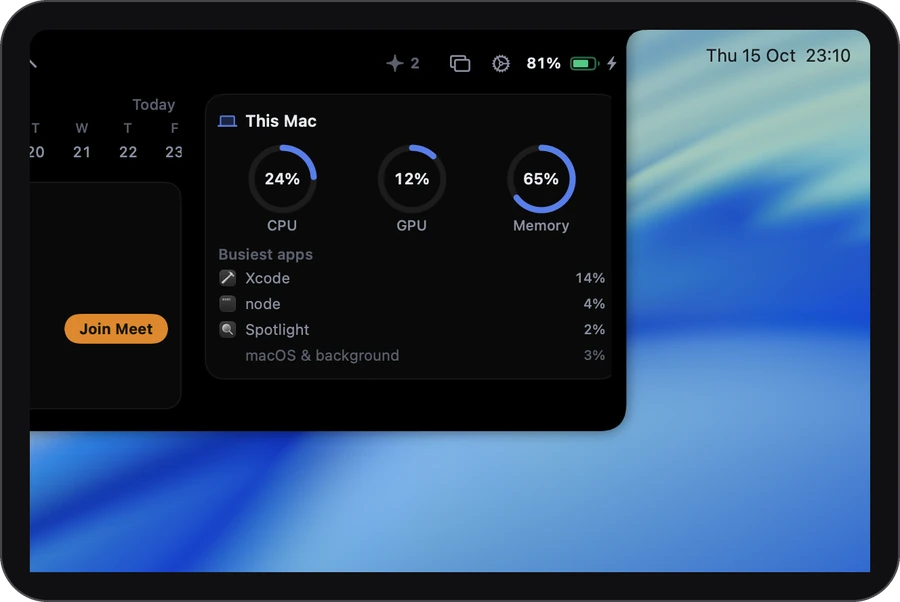
How it works
-
1
Switch it on
It’s off until you turn on System in Settings › The notch.
-
2
Open the Dashboard
The rings turn amber, then red, as your Mac gets busy.
-
3
See who’s busy
The three busiest apps, with the rest on one line, so it adds up to the CPU ring.
At a glance
The fan spins up. You know why before you look for it.
Busiest apps
- Photos21%
- Safari9%
- Music5%
- Everything else3%
Blue is fine. Amber means it’s working hard. Red means it’s near its limit.
The details
- Apps, not processes
- Helpers and extensions count under the app they belong to.
- Memory in plain numbers
- Point at the memory ring to read, say, 6.2 of 16 GB in use.
- Light on your Mac
- Figures are read every 3 seconds while the notch is open and every 6 when it’s shut. The app list only updates while you’re looking.
- Battery beside the camera
- The closed notch can show your battery. It turns amber when low, and shows the time left in red when it’s nearly empty and unplugged.
- Charging held
- When your Mac is plugged in but holding its charge to protect the battery, Airlock says so.
Settings
It starts out like this. Everything is in Settings › The notch.
- SystemCPU, GPU and memory on the Dashboard
- BatteryThe battery card
- Battery percentageBeside the camera, in the closed notch
Which plan
In every plan, Free included. All of This Mac is in Free, with no card and no account. Plus and Pro are for longer calls, better notes and more agents.
It asks for: Nothing. It reads the figures macOS already gives every app.
Compare the plans →Questions
Does it show temperature or fan speed?
No. It shows CPU, GPU and memory, and the battery beside the camera.
Why don’t I see a GPU ring?
Some Macs don’t report it. Where it’s missing, the ring is left out.
Does it slow my Mac down?
It reads a handful of figures every few seconds, and the list of apps only while the notch is open.
Can I hide the battery beside the camera?
Yes. Turn off Battery percentage in Settings › The notch, under Beside the camera.
More in the notch
- Call notesOne tap as a call starts. The notes are ready when it ends.
- Clipboard historyEverything you copied, searchable.
- Media & soundNow playing, and a level per app if you turn it on.
- DictationHold ⌃, talk, let go. It types.
- TodayYour next meetings, one click to join.
- Drop shelfPark a file mid-drag. Drag it back out.
- Keep awakeNo sleep while you need it.
- Coding agentsClaude Code’s questions, answered from the notch.