How it works
-
1
Allow Calendar
Turn it on and allow access. Airlock shows the calendars your Mac already has, including accounts you added to Calendar.
-
2
Look up
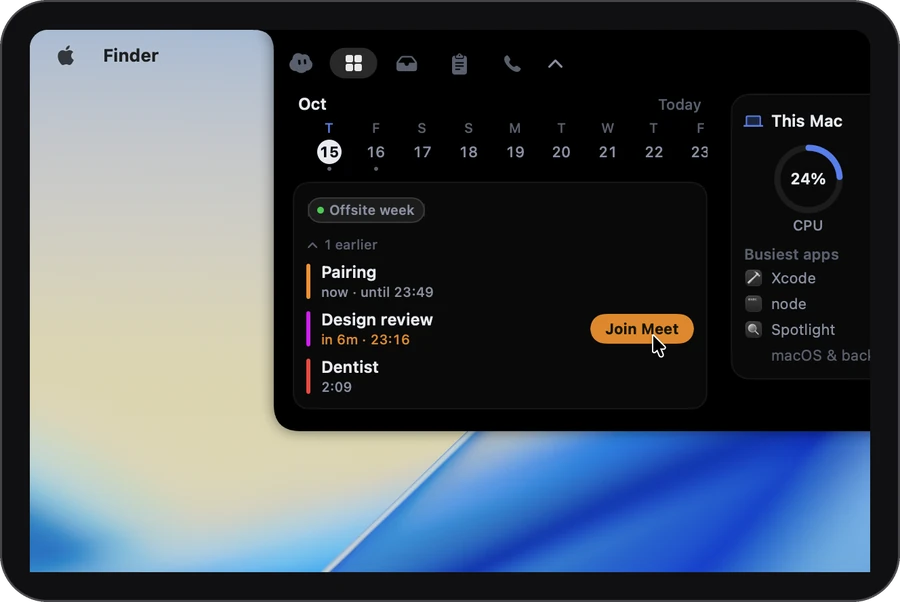
From 10 minutes before, the closed notch counts down in amber: 8m, then now. It never opens by itself.
-
3
Click Join
It finds the Zoom, Meet or Teams link in the invite. Zoom and Teams open in their own app if you have it.
 8m
What’s next
No hunting for the link.
Offsite weekAll day
Design reviewin 5m · 10:30
Join MeetLunch with Sam13:30
Weekly launch check15:00
Join ZoomDentist17:00
Join finds the link in the event’s address, location or notes. It works with Zoom, Google Meet, Microsoft Teams, Webex, Whereby, Around, Jitsi Meet, BlueJeans, Discord and other meeting rooms.
The details
- Six weeks ahead
- A strip of days runs from last week to six weeks ahead. Pick a day to see its meetings.
- Read-only
- Airlock never creates, changes or deletes events. Click one to open it in Calendar.
- Only the calendars you want
- Choose which ones show in Settings. Until you pick, Airlock shows them all, including any you add later.
- It doesn’t jump at you
- The countdown stays in the closed notch. The panel opens only when you point at the notch or click it.
Privacy
What stays on your Mac
Airlock only reads the calendars on your Mac, and only with your permission. The privacy page lists every request Airlock makes.
Stays on your Mac
- Your events, their times and their meeting links
- Which calendars you chose to show
Leaves your Mac
- Nothing. Join opens the meeting in its app or your browser, as if you’d clicked the link.
Settings
It starts out like this. Everything is in Settings.
No key needed: point at the notch or click it, and your meetings are on the Dashboard tab.
- CalendarYour next meetings in the open notch
- CalendarsAllEvery calendar, including new ones, until you choose
Which plan
In every plan, Free included. All of Today is in Free, with no card and no account. Plus and Pro are for longer calls, better notes and more agents.
It asks for: Calendar access, asked when you turn it on.
Compare the plans →Questions
Does it work with my work or Google calendar?
If the Calendar app on your Mac shows it, Airlock does too. Add the account in Calendar’s settings and its meetings appear in the notch.
Can I add or change events?
No. Airlock only reads your calendar. Click an event to open it in Calendar.
Do all-day events show?
Yes, as small chips above the timed meetings, marked All day.
More in the notch
- Call notesOne tap as a call starts. The notes are ready when it ends.
- Clipboard historyEverything you copied, searchable.
- Media & soundNow playing, and a level per app if you turn it on.
- DictationHold ⌃, talk, let go. It types.
- This MacHow hard it’s working, and who’s to blame.
- Drop shelfPark a file mid-drag. Drag it back out.
- Keep awakeNo sleep while you need it.
- Coding agentsClaude Code’s questions, answered from the notch.