Free
€0
Answer one coding agent at a time from the notch. Others ask in their own terminal. The safety rules cover every agent.
Coding agents
Claude Code stops to ask before it runs a command or edits a file, often in a tab you’re not looking at. Airlock brings the question to the notch: yes, no or always.
Airlock is a Mac app for MacBooks with a notch. On your phone? Send yourself the link and open it on your Mac.
Free plan, no card needed · macOS 26 or later · Apple silicon
In Settings › Agents, click Connect. Airlock adds its hooks beside yours, and removes only its own if you disconnect.
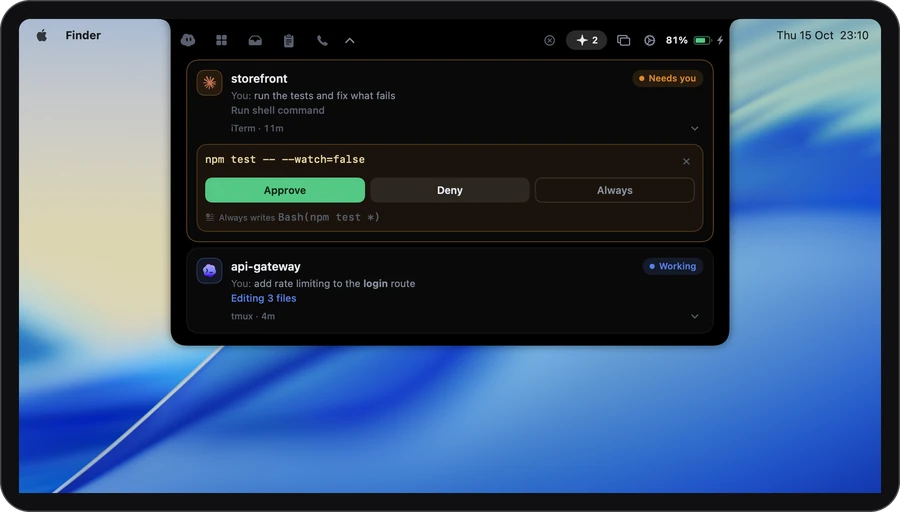
When Claude Code needs a yes or asks you a question, the request comes up in the notch. Several wait their turn, oldest first.
Approve with ⌘Y, Deny with ⌘N, or Always to make it a rule. Esc hands it back to the terminal.
Say yes without leaving what you’re doing.
 storefrontClaude Code · iTerm
You: run the tests and fix what fails
npm test -- --watch=false
Needs you
Try it: pick an answer.
storefront/.airlock/policy.yaml
Always writes one plain line. Force pushes, sudo and deleting folders ask every time, and Always isn’t offered for them.
A * stands for anything, and never-run rules win over the rest. Rules live in your project, or in your home folder for everywhere. Edit them in Settings or by hand.
Privacy
Airlock talks to Claude Code over a local connection on your Mac. The privacy page lists every request Airlock makes.
It starts out like this. Everything is in Settings › Agents.
You can change ⌘⇧A in Settings › Agents. Always has no key, on purpose.
€0
Answer one coding agent at a time from the notch. Others ask in their own terminal. The safety rules cover every agent.
€3.99 a month
Answer every agent from the notch.
€7.99 a month
The same as Plus: every agent, from the notch.
It asks for: Claude Code or Codex. Nothing on your Mac.
Compare the plans →It sees the request itself, such as the command Claude Code wants to run, so it can show it to you. That stays on your Mac: Airlock talks to Claude Code over a local connection, and never sends your code or prompts anywhere.
A request nobody answers goes back to the terminal after 5 minutes, and Claude Code asks there as usual. Waiting never approves anything.
Deleting folders, sudo, force pushes, hard resets, wiping a disk, piping a download into a shell, dropping a database and production deploys. These can’t be turned into rules.
Yes. In those modes a request shows only when Claude Code itself would ask.
No. Airlock is an independent app that works with Claude Code.
Notarized by Apple · macOS 26 or later · Apple silicon
or brew install --cask gdelolmo7/tap/airlock